Std. 1
2019. 9. 27. 11:40ㆍWebpack/WORK
준비.
1. vscode 설치
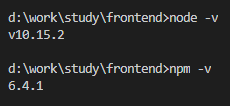
2. node & npm 설치
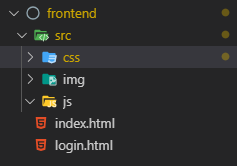
3. 작업폴더 설치
html과 css가 존재합니다.
git 배포 및 소스관리
1. git 설치
2. github.com
1) 회원가입/로그인
2) Start a project
3) Create a new repository
4) repository 이름 생성 후 public or private (3명까지 무료)
Terminal

vscode
Source Control
1) commit/push
2) https://github.com/imse0109/fetest
commit 확인
3. .gitignore 파일생성
파일에 아래의 내용을 추가합니다. 공유하지 않는 폴더목록입니다.
node_modules
/dist/
/release/
Git.
https://github.com/imse0109/fetest/commit/c6c6b4cf5eba43dbfb767af293aee05a7693c8e9
https://github.com/imse0109/fetest/commit/f70d0c60fc5da68d8feb03ab535328bcc10a62dc